AI 기반 크리에이티브 디자인 강의
7-5. 패션 화보 제작 기획
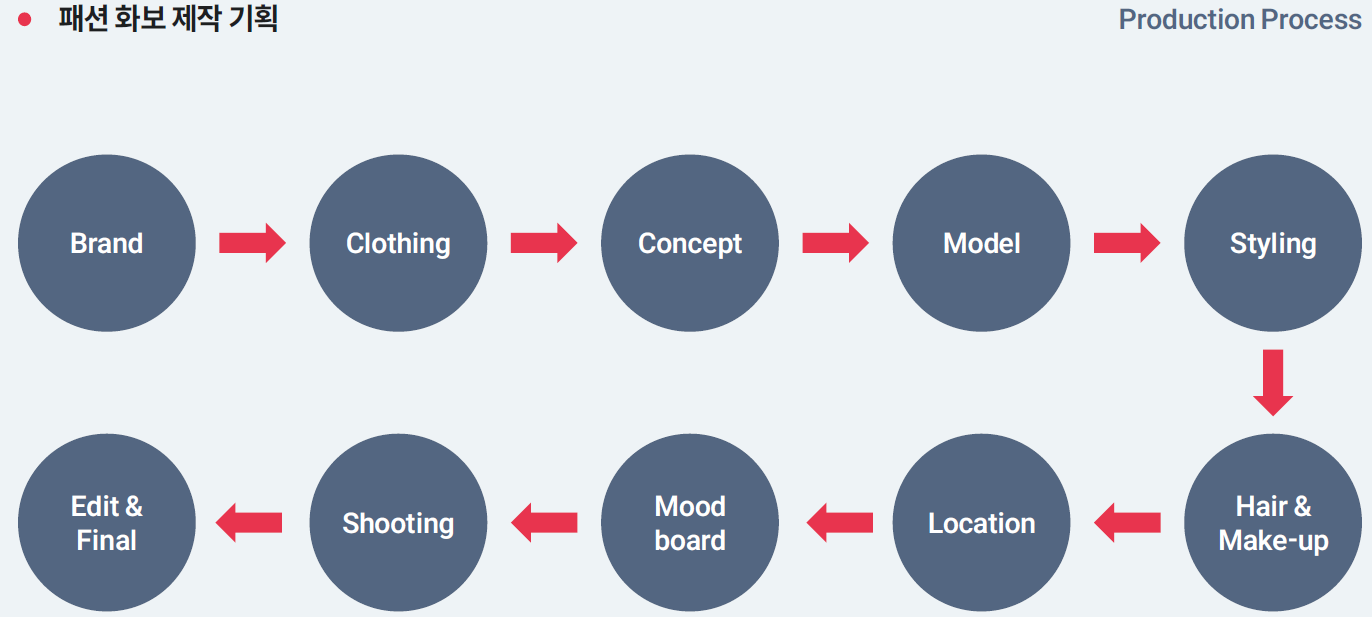
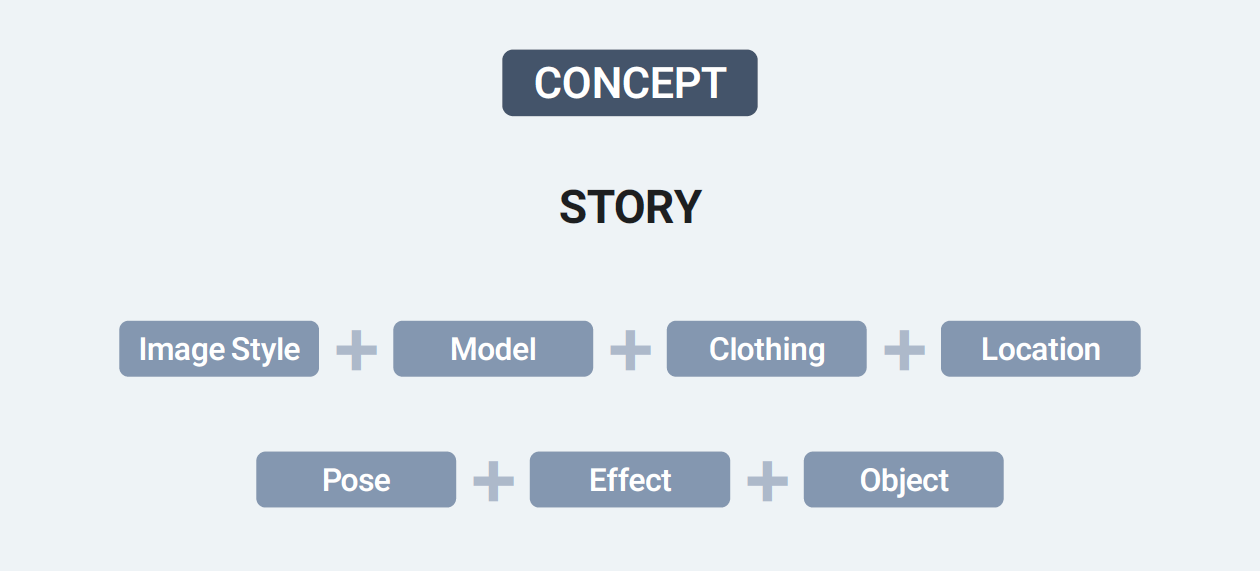
Concept 를 초반에 잡기 어렵다면 기존에 있는 좋은 이미지에서 영감을 얻는 것도 좋은 방법이다.
but. 똑같이 배끼는 것이 아니기 때문에 어디서 어떤 부분을 가져올 것인지, 해당이미지에대한 분석이 먼저 선행되어야 한다.
ex) 웨스앤더슨 감독의 그랜드부다페스트 호텔 영화의 이미지
대칭, 균형감, 화려한 컬러감, 등의 양식화된 아름다움, 빈티지에 대한 향수, 감정적인 섬세함을 나타낸다.
1. 부드러운 파스텔 톤과 빈티지 색감 = 동화적인 분위기와 따듯한 감성의 빈티지 색감
2. 대칭구도와 정중앙 프레임 = Centered Framing & Perfect Symmetry
3. 1950~60년대 복고풍미학 = 20세기 중반의 클래식한 디자인과 문화
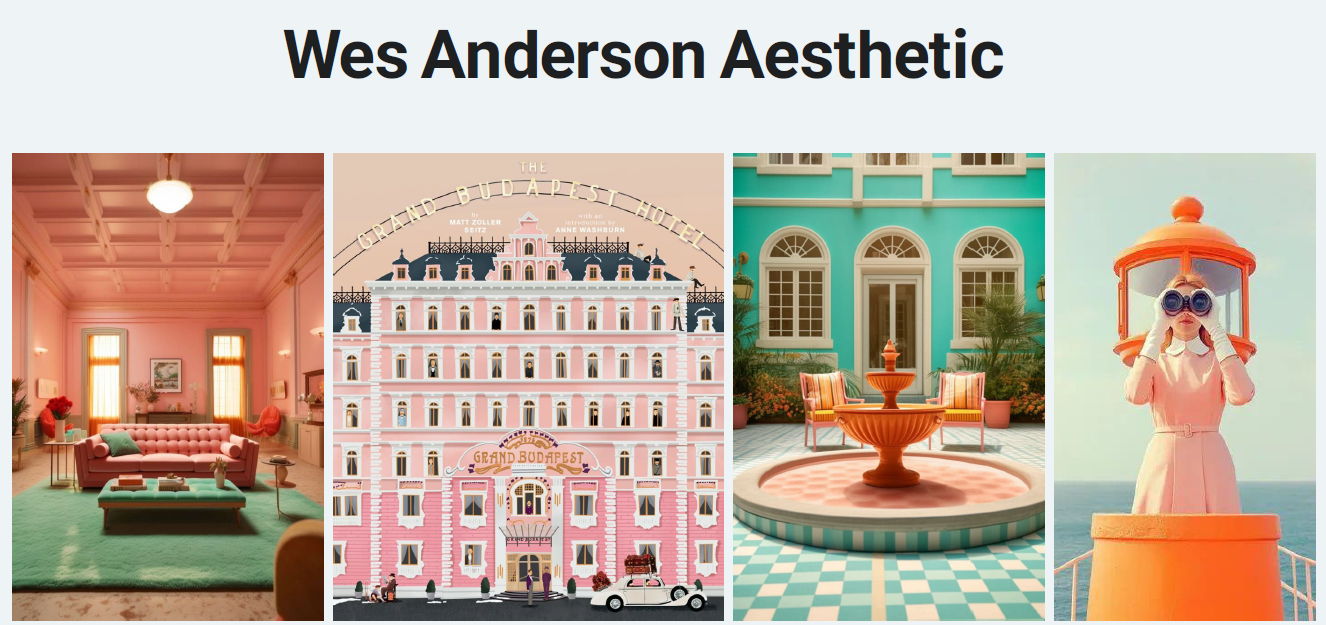
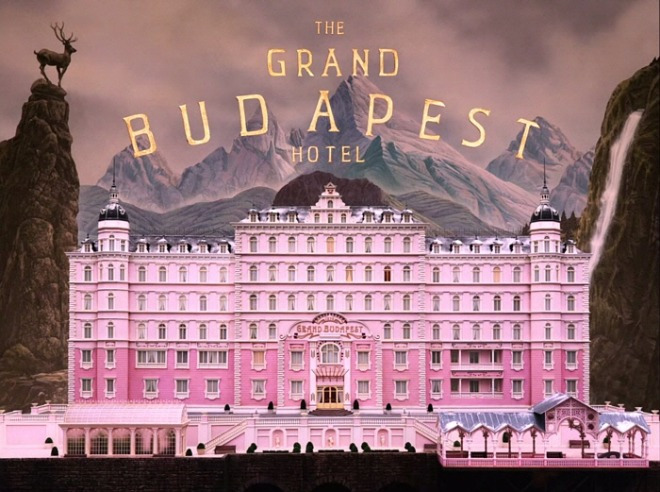
처음 리서치에서는 시대적 의상 스타일과, 웨스 앤더슨 스타일의 의복을 러프하게 먼저 무드보드를 만든다.
무드보드를 만들어서 p코드를 제작하고 모델을 생성해 본다.
[ Model Planning ]
| 항목 | 기획키워드 |
| 얼굴분위기 | Deadpan expression / Neutral face / No smile / Introverted / Slightly awkward |
| 인종/국가 | European features, Northern European, Classic European face |
| 연령대 | late 20s / early 30s |
| 체형 | 165-170cm, Slim body / Straight body line / Modest proportions |
| 디테일 | Dark brown hair or Muted blonde / Minimal make-up, matte finish |
무드보드 예시
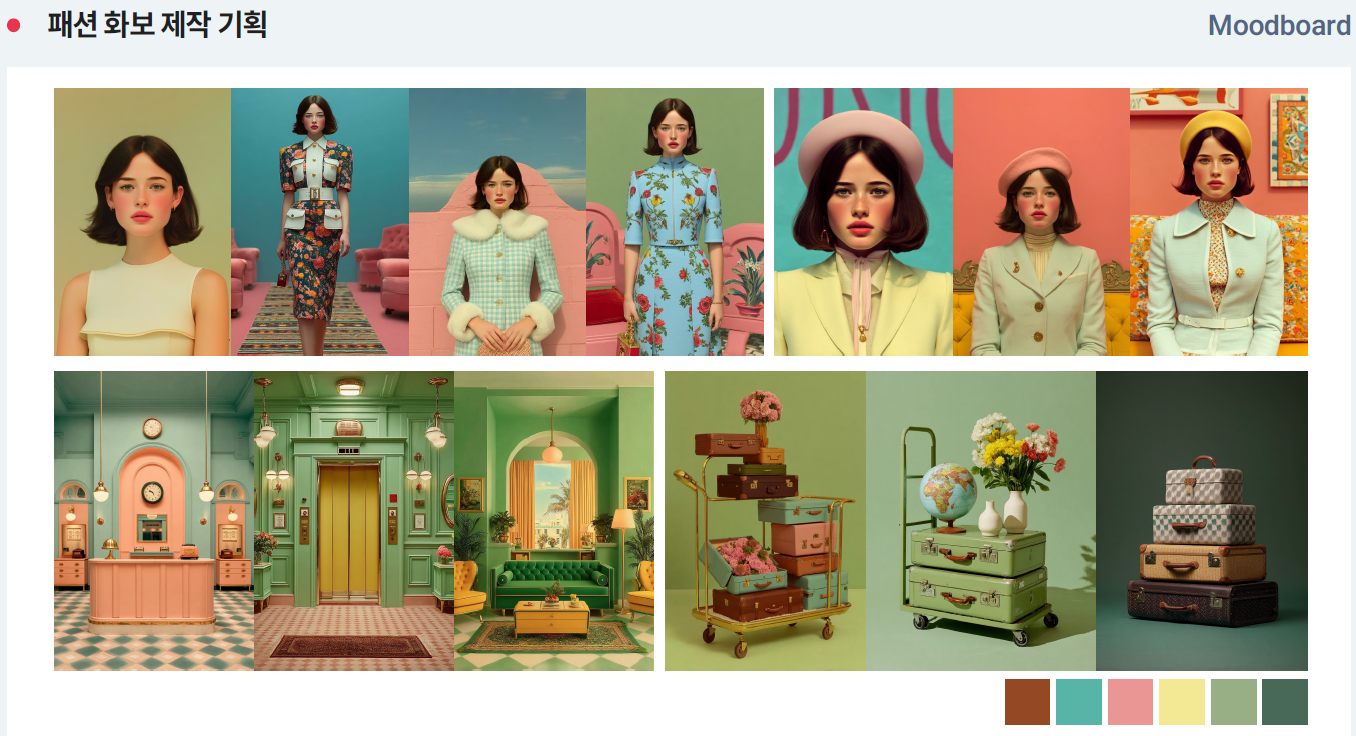
화보구성전략 [Editorial Structure]
① Main cut: 메인키비주얼(화보전체를대표하는장면)
② Sub cut1: 캐릭터중심컷(인물+의상강조)
③ Sub cut2:인물+소품및스타일링클로즈업
Storytelling
① 이화보의시간대는언제인가?
② 이장소는어떤곳인가?
③ 인물은왜이공간에있는가?
④ 이장면직전과직후에는어떤일이있었는가?
⑤ 이화보를한문장으로요약하면무엇인가?
프롬프트구조설계
| 항목 | 내용 |
| World & Scene 세계관(시대) & 장면 |
1960s Europe, small provincial town, annual local festival approaching, pre-festival stillness, quiet anticipation, nostalgic atmosphere, subtle melancholy, cinematic storytelling moment |
| Character 캐릭터 묘사 |
mysterious young widow, elegant European woman, late 20s, composted posture, restrained emotion, distant gaze, quiet grief, inner tension, refined presence |
| Outfit & Styling 의상 & 스타일링 (헤어및 악세서리등) |
1960s couture-inspired dress, tailored silhouette, mid-length wool dress, muted color, structured coat, leather globes, classic handbag, minimal jewelry, vintage hat or beret |
| Location 위치 |
old European boutique hotel lobby, mid-century interior, marble or patterned tile floor, wooden reception desk, tall windows, soft curtains |
| Composition & Camera 구도 및 카메라 |
Centered composition, symmetrical framing, medium-wide shot, eye-level camera, subject slightly off-center, negative space, cinematic framing, still moment before movement |
| Lighting & Color 조명 & 색상 |
soft natural window light, gentle shadows, diffused daylight, low contrast, muted tones, warm-cool balance, desaturated cinematic color grading |
| Style Reference 스타일 참조 |
1960s European cinema, art-house film still, Wes Anderson subtle symmetry (less playful, dynamic), vintage fashion editorial, cinematic fashion photography |
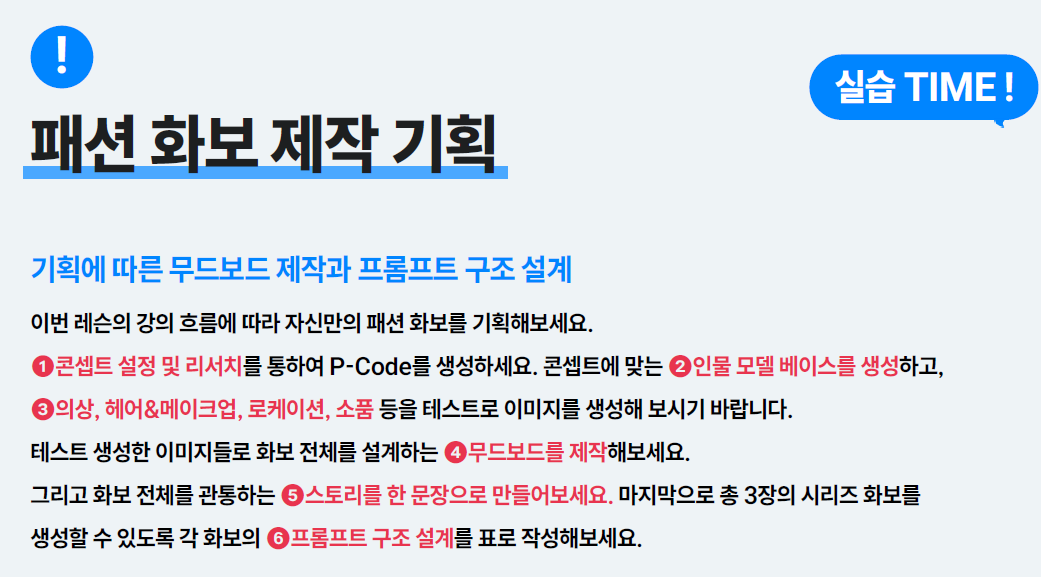
7-6. 프롬프트 작성 및 이미지 생성
Model Planning
| 컷/공간 | World & Scene | Outfit & Styling | Composition & Camera | Lighting & Color |
| Main Cut Lobby 16:9 |
1960s European boutique hotel lobby, inspired by Wes Anderson | structured coat with fur, beret and glove in muted pastel color | centered composition, a symmetrical wide shot, shot by Hasselblad x2d | cinematic warm lighting, diffused daylight, in muted pastel color palette, retro European mood |
| Sub Cut 1Elevator 2:3(16:9) |
Silent hotel corridor near elevator, | off-white dress and yellow high heels | centered composition, a symmetrical wide shot, shot by Hasselblad x2d | cinematic warm lighting, diffused daylight, in muted pastel color palette, retro European mood |
| Sub Cut 2Living room 16:9 |
Vintage living room in hotel, surrounded by dozens of Louis Vuitton handbags and suitcases | purple velvet setup suit and deep green high heels | centered composition, a symmetrical wide shot, shot by Hasselblad x2d | cinematic warm lighting, diffused daylight, in muted pastel color palette, retro European mood |

웨스앤더슨 감독 스타일의 무드보드를 제작 후 p-code 생성, 생성된 p-code로 이미지 제작
[prompt]
Ultra-ealistic fashion photography, shot by Hasselblad x2d, mysterious female model wearing a muted pink structured coat fur, gloves, arrived at the 1960s European boutique hotel lobby in Wes Anderson style, centered and symmetrical composition, medium-wide shot, eye-level, generous negative space, soft natural window light, diffused daylight, desaturated warm-cool balance, ultra-high resolution
[Trouble Shooting]
- 수정할 부분 : 강의에서 모델이 좀더 넓은 공간에서 자연스럽게 방금 호텔에 들어온 느낌이면 좋겠다. 그러나 모델이 생각보다 크게 생성이됐다.
①배경공간을넓어보이게하려면?
먼저문제가발생하는근본원인을찾아야합니다.
- 미드저니는기본적으로‘사람중심클로즈업’선호
- 모델은자동으로주피사체가되고공간은배경이되기때문
- P-Code생성을위한무드보드이미지의영향
잘못해결하려는방식
- 프롬프트에‘넓은공간’관련형용사만추가
- background설명을자세하고,길게늘려서추가
- 요소를많이배치해서공간감을만들려하는경우
- ‘cinematic wide shot’키워드반복
❶--sref참조이미지활용
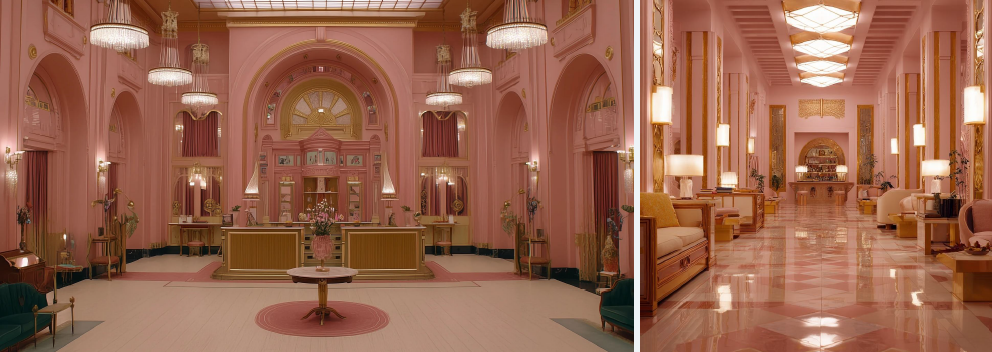
❷카메라거리및샷타입고정
Shotsize(촬영의 범위)를명확하게정해서,렌즈를뒤로빼줍니다.
- wide shot / long shot
- full body with ample space around
- distance camera position / camera pulled back
❸의상설명중신발을따로명시
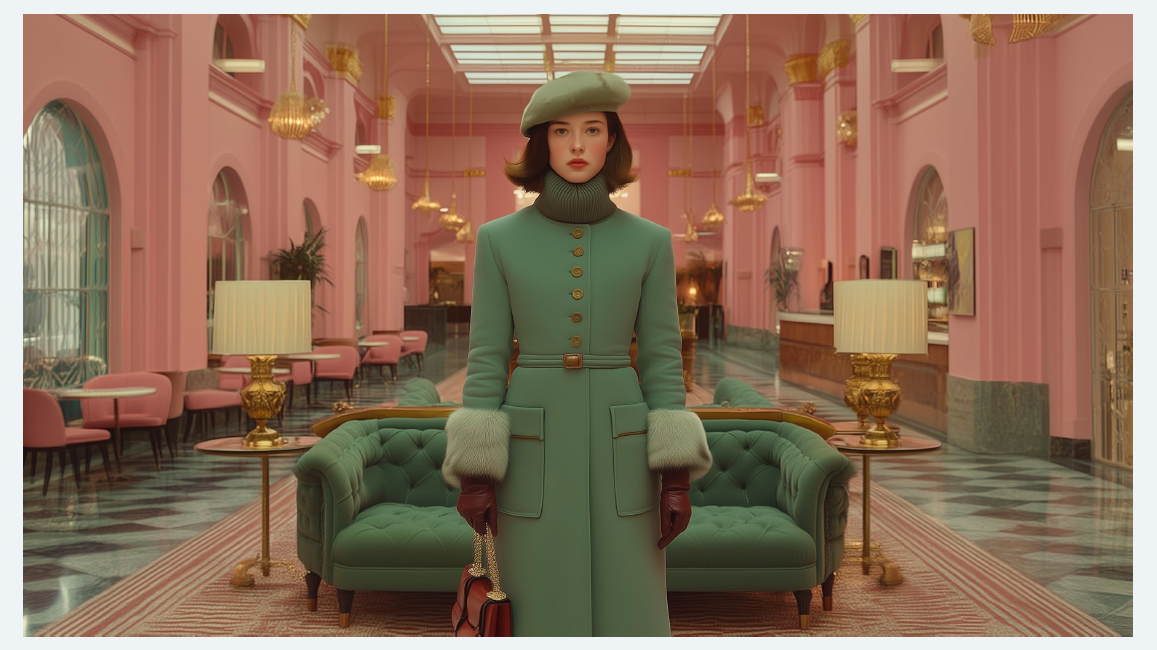
[prompt]
Fashion photography, sophisticated magazine editorial image of a female model dressed in muted green structured coat with fur, beret, paired with premium dark brown leather boots and gloves, posed against a symmetrical wide shot of a grand hotel lobby from the distance, in muted pink and golden accent, inspired by Wes Anderson, the scene shows a vintage art deco reception desk, ornate chandeliers, deep green velvet sofa, polished marble floors and tall arch windows, centered composition, cinematic warm lighting, diffused daylight, muted pastel color palette, retro European luxury design, hyper-realistic texture, shot by hasselbladx2d
[최종]
②이미지에서텍스트를보이지않게하려면?
텍스트가잘생기는환경적조건
- 호텔,로비,엘리베이터등사인시스템이존재하는공간
- 패션화보+상업사진스타일
- editorial / symmetry / architecture 강조
❶프롬프트에서텍스트를‘의미적으로차단’ (아래 중 2~3개 사용)
- no visible text anywhere
- no letters or numbers
- no signage, no labels and logos
- clean surfaces without text / markings
- blank walls and panels
❷--no 파라미터로강력하게차단
이미지에 나타나지 않길 바라는 특정요소를 지정하여 제거하는 부정프롬프트(negative prompt)기능
- 기본구문:(원하는이미지묘사)--no (제외할요소)
- /imagine prompt: a bowl of fruit --no apple
- 특정색상제거/원치않는피사체제거/스타일수정/텍스트제거
- 다중제외 가능/완전한제거 보장불가
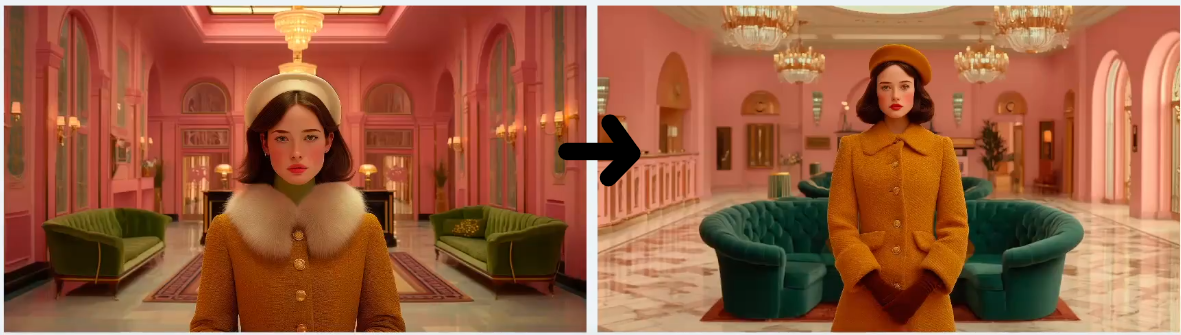
[Prompt]
Head to toe photoshoot of fashion editorial, symmetrical wide shot of a grand hotel lobby in muted pastel and golden accent, inspired by The Grand Budapest Hotel, full body shot of mysterious female model wearing a mustard structured coat with fur, and gloves, arrived at the hotel lobby from a distance, whimsical yet elegant atmosphere, cinematic warm lighting, diffused daylight, muted pastel color palette, retro European luxury design, hyper-realistic texture, shot by Hasselblad x2d
여러방법을 썼는데도 안될경우는 P-Code의 영향이 커서 그럴 수 있다.
③P-Code의영향을어떻게조절할까?
프롬프트에서명확하게지시한스타일,구도,무드가반영되지않을때
- 인물얼굴,표정,비중이비슷한방향으로고정
- 인물의포즈또는촬영앵글이단조롭게반복되는경향
- 조명이나색감이계속비슷한감성으로생성
❶--stylize값으로P-Code영향간접제어
--stylize는모델이창의적으로해석할수있는자유도를의미
- P-Code가강할수록stylize값을낮춰서프롬프트우선권을회복
- stylize는P-Code의강도를직접줄이지않지만,현실적인조절수단
❷프롬프트구조를‘명령형’으로변경
P-Code가강할수록형용사↓,구조,구도,행동지시↑
- 네거티브지시활용(ex. no dramatic lighting)
- --no 파라미터로P-Code가자주끌고가는‘버릇’차단(특정조명,특정색감,표정등)
--stylize 값을 낮췄을 때 톤다운된 이미지가 많았던 무드보라 톤이 조금 더 쨍하게 올라간걸 확인 할 수 있다.

Sub Cut / 1Elevator / (16:9)
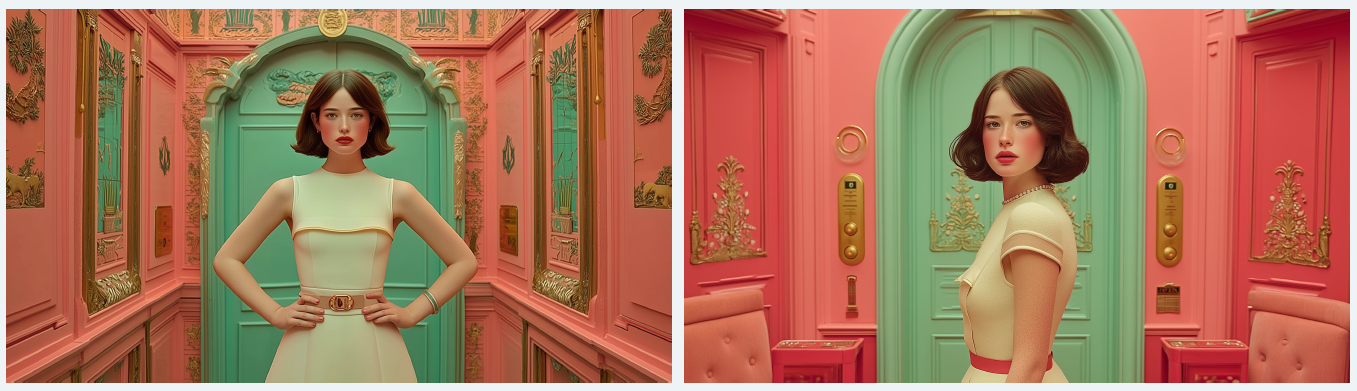
Fashion photography, luxurious editorial, a side shot of a female model standing in an art deco elevator, still posture, the scene is symmetrical and the colors are pastel muted pink and green, in the style of Wes Anderson, cinematic warm lighting, diffused daylight, retro European mood, hyper-realistic texture, shot by Hasselblad x2d
상반신만 보여줘서 비율을 2:3으로 변경함.
비율변경도 하나의 방법이다.
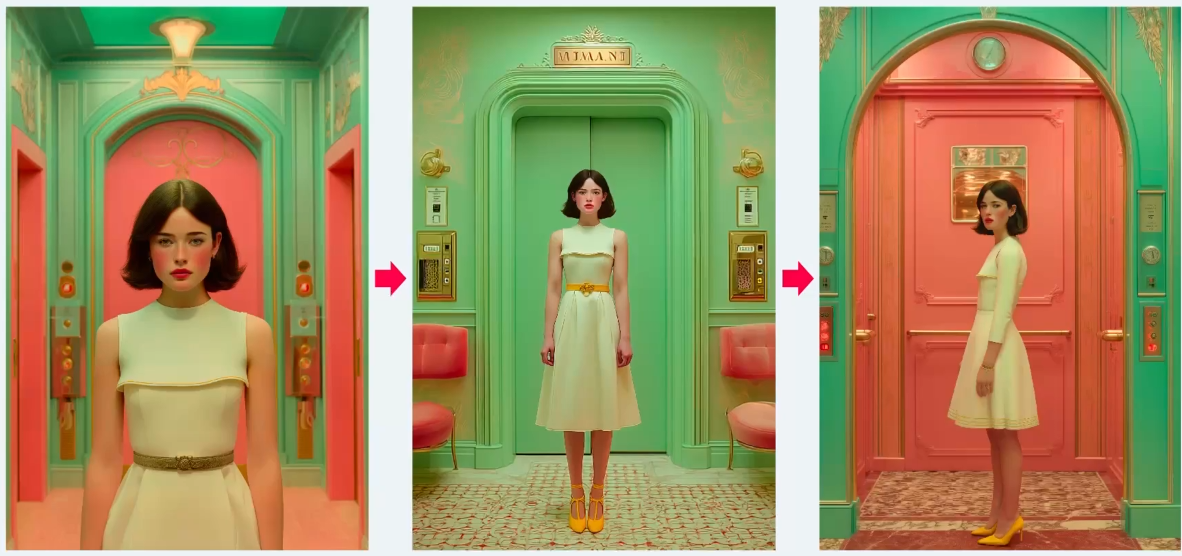
④프롬프트 수정만으로 해결이 되지 않을때?
프롬프트를아무리고쳐도문제가해결되지않을때,
- 초기기획:호텔복도+모델이수트케이스를들고걷는장면
- 실제생성결과에서발생한문제:공간에서원근감이강하게표현
- 공간위주로보이거나,인물위주로보이거나,소품이축소
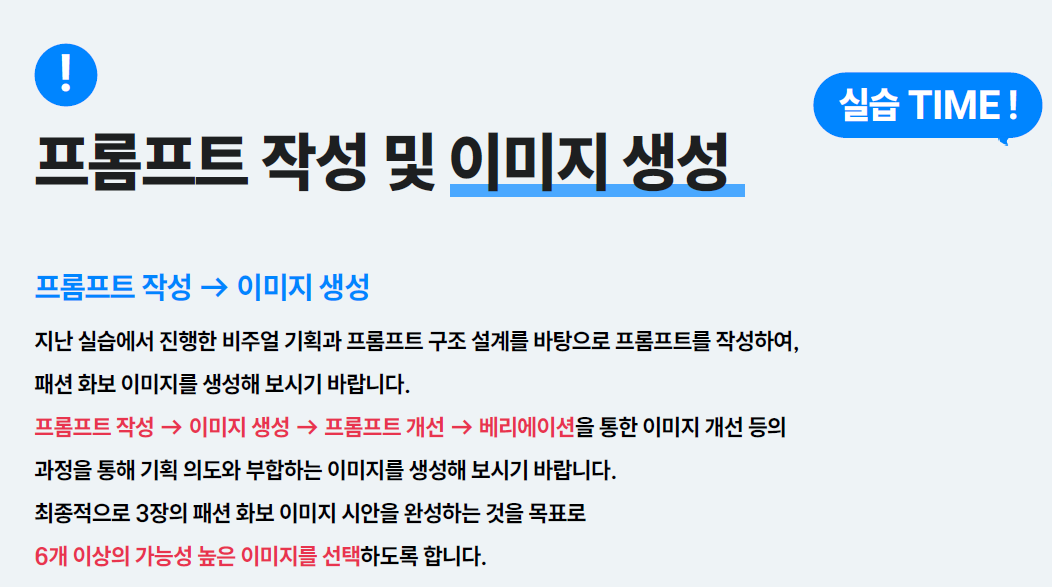
❶프롬프트 수정보다 장면을 다시연출
인물과수트케이스를가장잘보여줄수있는상황은무엇일까?
- 공간이동:호텔복도→ 객실내거실(카메라거리가까워짐)
- 상황:이동→ 정지(안정감↑)
- 정지된인물+안정적인공간+명확한배치로재연출

7-7. 이미지 재가공 및 완성
①이미지를선택하는기준
- 완벽한한장보다,서로잘어울리는3장이더중요(3장동시에비교)
- 얼굴유사도100%보다,얼굴의‘구조적일관성’
- 포즈&카메라앵글의리듬(3장같은구도,완전다른앵글도)
- 조명방향이완전히다르지않을것
- 스타일오류보다‘보정가능한오류’에집중
| 항목 | 구조레이어 –바꿀수없는것 |
연출레이어 –조정가능한것 |
톤&조명레이어 –맞출수있는가 |
서사레이어 –화보로서의미있는가 |
| 체크포인트 | 얼굴골격 신체비율 카메라시점 |
포즈 시선 손위치 |
노출범위 명암대비 색온도 |
이컷이빠지면이야기가끊기는가? 기능이중복되는컷은없는가? |
| 주의사항 | 구조가다른컷은아무리예뻐도제외할것 | 다소어색해도 해석가능하면OK |
완벽히같은필요X 하나의방향으로 끌고갈수있으면OK |
화보에서이미지가가지는 ‘역할’을고려하여선택 |
| 포토샵 후보정으로 수정해서 맞출 수 있는 부분인지 파악해서 데려갈 것은 데려간다. | 시즌룩북이나 컨셉화보에서는 아주 중요한 부분이므로 전체적인 분위기와 스토리도 고려해야한다. |
②이미지톤을맞추는법
- 기준이미지설정(Tone Master Cut): 무드가가장명확한컷
- 밝기(Exposure) 통일:Levels / Curves
- 대비(Contrast)통일:얼굴윤곽대비/옷주름명암/배경깊이감
- 색온도(Color Balance)통일:피부톤/그림자색
- 채도(Saturation)조절:채도는낮추는방향이안전

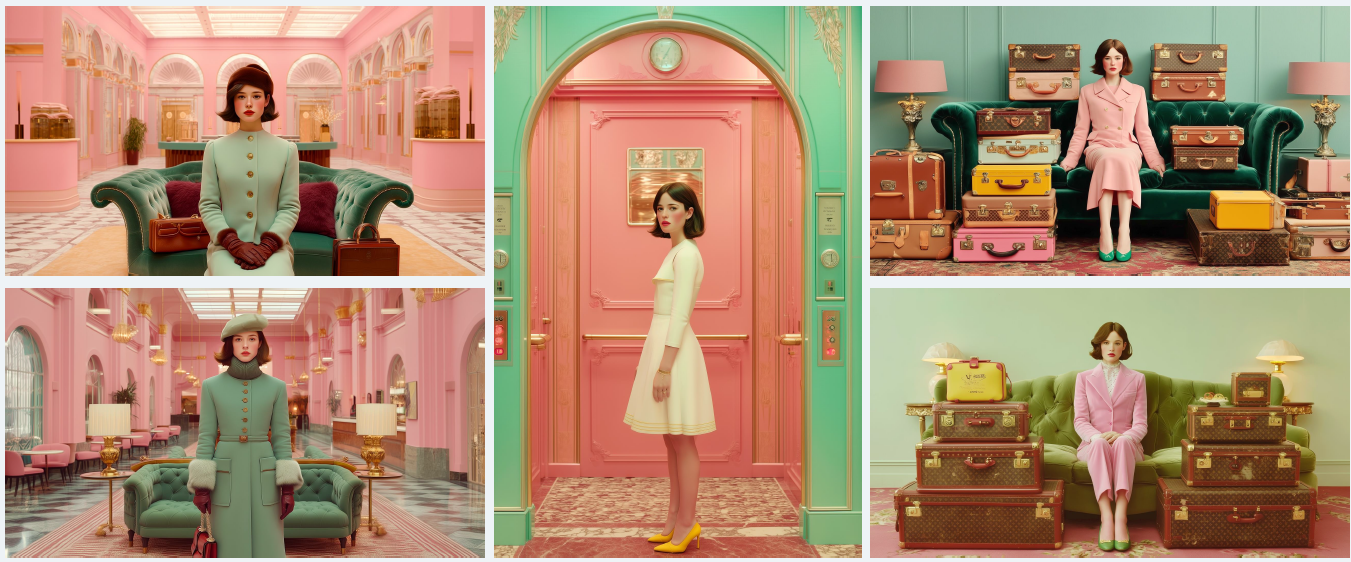
오른쪽 이미지 두개는 캐리어와 딥그린 소파가 파스텔톤의 화보의 무드를 해치는 것 같다.
추가적으로 이미지 생성하여 무드를 맞추었다.
③얼굴의일관성을높이는법
- 눈,코,입기준으로일치→ 얼굴골격,비율,인상중심으로
- 기준 얼굴(Master Face)선정:얼굴구조가가장안정적인컷
- 얼굴 구조 맞추기:눈간격,코위치,턱선각도,얼굴크기등
- 전체 얼굴 합성보다,‘부분합성’→ 자연스럽게마스크처리
- 인상을 결정하는 요소:눈매방향,눈꼬리각도,입꼬리위치
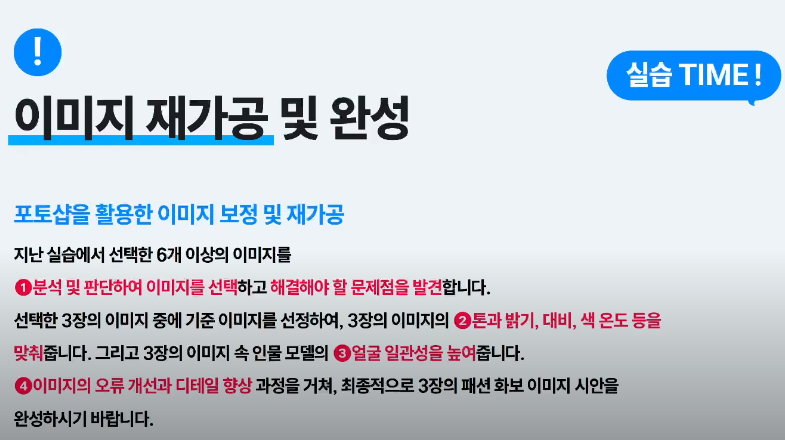
④이미지의오류개선,디테일향상
- 다른 생성 이미지로부터 부분합성
- 오류의‘존재감’을 줄여서 해결하는방법(crop) _ 외곽부분이면 크롭으로 단순히 해결가능
- 초점흐리기&심도활용(아웃포커싱영역으로)
- 그림자&톤속으로 묻기(배경톤과자연스럽게섞기) ex) vignetting 비네팅
이미지를 생성 할때 배경이든 물건이든 요청사항이 많을경우
미묘하게 어색한 부분들을 포토샵으로 후보정.. 수정한다.
[느낀점]
AI가 만들어주는 이미지가 만능은 아니고, 100% 내마음에 들 확률은 거의 없기 때문에 디자이너로서 후가공 능력도 잘 갖추고 있어야 한다는 것을 더 깊이 느꼈다.
포토샵 스킬도 더 잘 연습해 보아야 할 것 같다.
'AI디자이너 캠프' 카테고리의 다른 글
| [TIL] AI 그래픽 디자이너 D-19 Firefly 효과 비교 / 이미지 프롬프트 가이드 (0) | 2026.07.02 |
|---|---|
| [TIL] AI 그래픽 디자이너 D-19 포토샵 뉴럴필터,누끼, 부분조정 (0) | 2026.07.02 |
| [TIL] AI 그래픽 디자이너 D-14 LEGODT 리브랜딩 프로젝트 (0) | 2026.06.25 |
| [TIL] AI 그래픽 디자이너 D-13 카메라 촬영 기법, 온도, 빛 방향 프롬프트 (0) | 2026.06.24 |
| [TIL] AI 그래픽 디자이너 D-12 P-code, 모델생성 가이드, ow (0) | 2026.06.23 |