AI 기반 크리에이티브 디자인 강의
5-1. 프롬프트 분석 및 의도 파악 (1)
다른사람의 프롬프트 레퍼런스로 배우는 방법
- 다양한 스타일과 테크닉 습득가능
- 내가원하는 결과를 도출하는 '추론능력' 향상
- 프롬프트 수정 및 재작성 실습을 통해 프롬프트 구성 능력 향상
- 참고 및 응용을통한 감각 향상
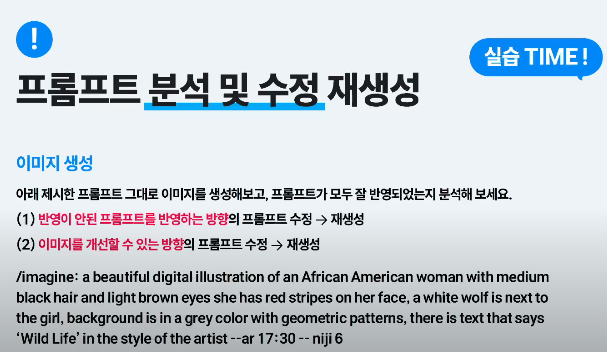
- [접두사] (화풍 및 시작)
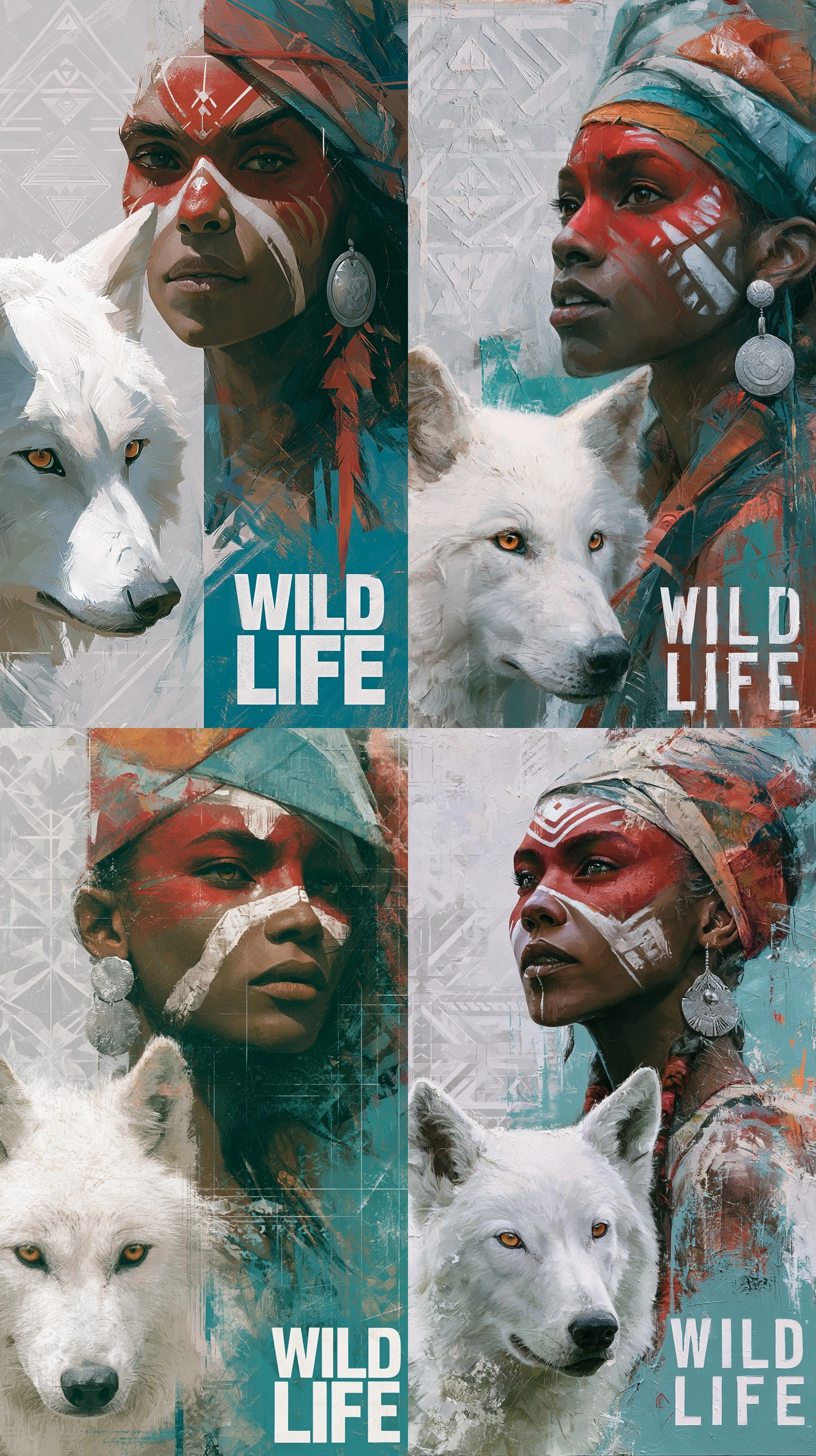
- a beautiful digital illustration of : 아름다운 디지털 일러스트레이션 형식으로 (실사가 아닌 깔끔한 그래픽 화풍 지정)
- [장면 - 인물 묘사] (누가)
- an African American woman : 아프리카계 미국인 여성 (인종)
- with medium black hair and light brown eyes : 중간 길이의 검은 머리카락과 밝은 갈색 눈동자를 가진 (외모 디테일)
- she has red stripes on her face, : 얼굴에 붉은색 줄무늬 페인팅이 있는 (특징 디테일)
- [장면 - 동물 및 행동] (무엇을)
- a white wolf is next to the girl, : 하얀 늑대가 소녀(여성)의 옆에 있는 (동반 객체 설정)
- [장면 - 배경 묘사] (어디서)
- background is in a grey color with geometric patterns, : 회색 조에 기하학적인 패턴이 들어간 배경 (추상적이고 세련된 배경 지정)
- [접미사] (추가 연출 및 무드)
- there is text that says ‘Wild Life’ : ‘Wild Life’라는 글자가 적혀 있는 (텍스트 삽입 유도)
- in the style of the artist : 작가의 고유한 스타일로 (니지저니 특유의 감각적인 아티스트 화풍을 무작위로 반영하라는 치트키성 표현)
- [파라미터] (AI 세팅 값)
- --ar 17:30 : 가로세로 비율 약 1:1.76 (스마트폰 배경화면이나 세로형 포스터에 적합한 긴 세로 비율)
- --niji 6 : 애니메이션/일러스트 전용 6버전 모델 사용
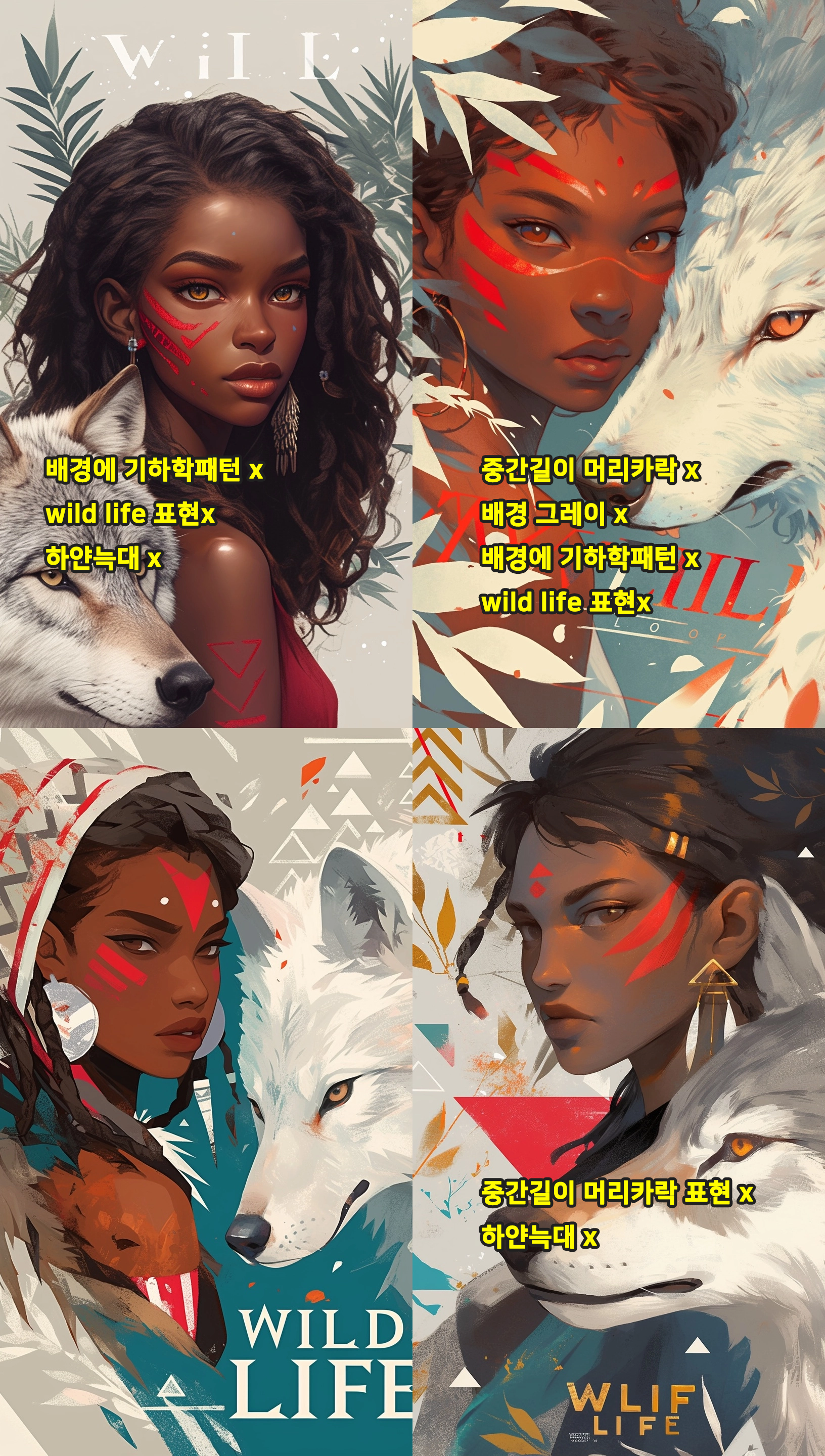
3번째 이미지가 전체적으로 프롬프트 반영을 가장 잘 한 이미지라고 생각된다.
그래도 전체적으로 잘 구현이 되는 프롬프트라고 생각된다.
5-2. 프롬프트 분석 및 의도 파악 (2)

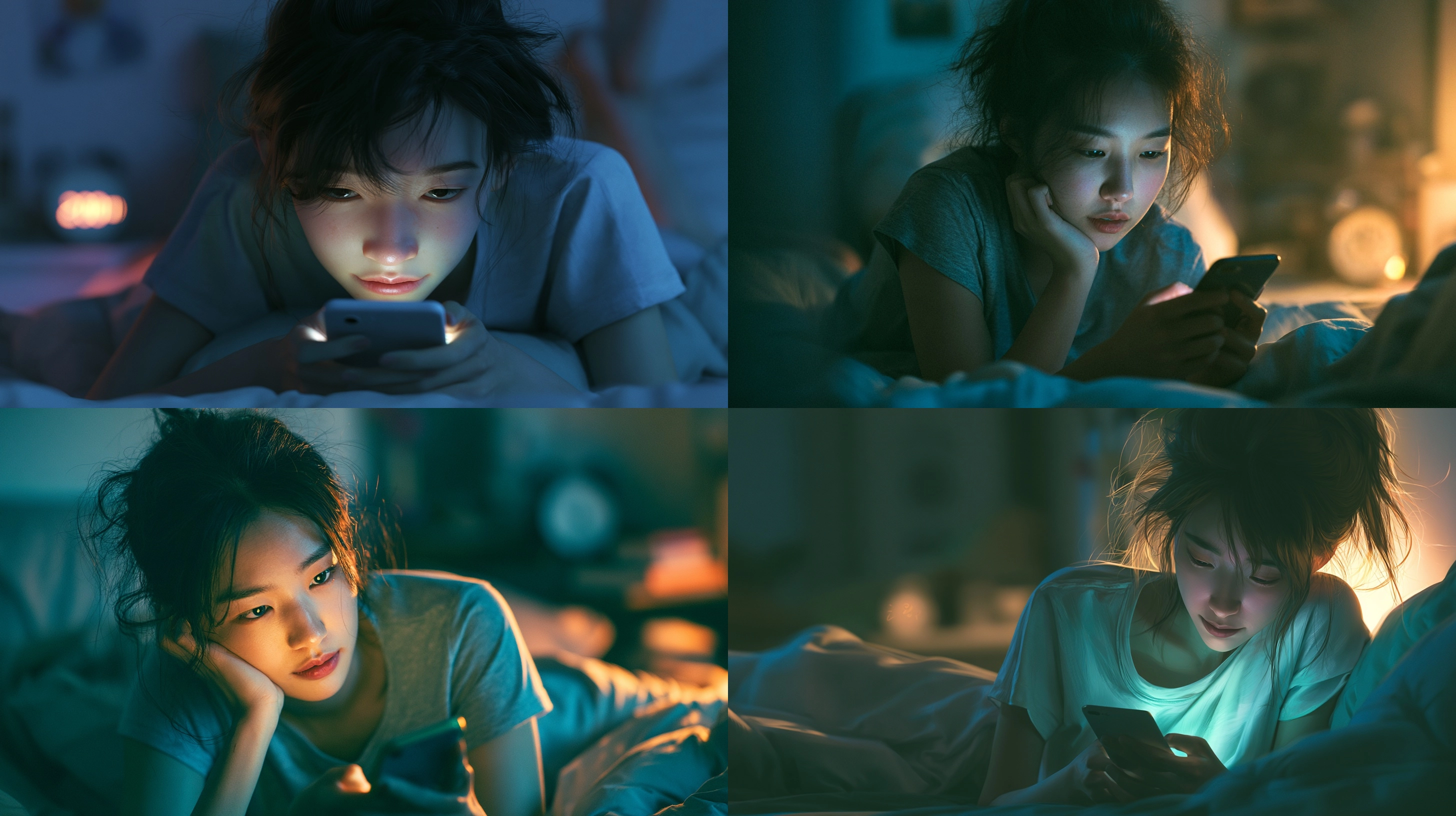
- [prompt] realistic shot of a teenage Korean girl lounging on her bed, her messy hair and casual thin short sleeve t-shirt adding to the natural feel, her eyes are locked on the glowing smartphone screen in her hands, her expression a mix of focus and subtle amusement, as if lost in the digital world, the soft light from the phone highlights her face, contrasting with them dimly lit room and blurred details in the background, a small clock on the nightstand shows 2:00 am, blending seamlessly with the calm, late-night atmosphere --ar 16:9
- [접두사] (구도 및 화질 기본값)
- a hyper-realistic shot of : 하이퍼 리얼리즘 스타일의 실사 사진 기법으로
- [장면 - 인물 및 상황] (누가, 무엇을)
- a teenage Korean girl lounging on her bed, : 침대에 누워 편하게 쉬고 있는 한국인 청소년 소녀
- her messy hair and casual thin short sleeve t-shirt adding to the natural feel, : 자연스러운 느낌을 더해주는 헝클어진 머리와 얇은 반팔 티셔츠 (의상 및 상태 디테일)
- her eyes are locked on the glowing smartphone screen in her hands, : 손에 든 빛나는 스마트폰 화면에 시선이 고정된 모습 (시선 처리)
- her expression a mix of focus and subtle amusement, as if lost in the digital world, : 디지털 세계에 빠진 듯 집중하면서도 미소를 머금은 복합적인 표정 (감정 및 표정 묘사)
- [장면 - 배경 및 조명] (어디서, 조명)
- the soft light from the phone highlights her face, : 스마트폰에서 나오는 부드러운 불빛이 얼굴을 비추고 (조명 효과 1)
- contrasting with them dimly lit room and blurred details in the background, : 어두컴컴한 방과 흐릿하게 처리된 배경 디테일과 대비를 이룸 (조명 효과 2 및 아웃포커싱 연출)
- a small clock on the nightstand shows 2:00 am, blending seamlessly with the calm, late-night atmosphere : 협탁 위 작은 시계가 새벽 2시를 나타내며, 고요한 심야 분위기와 자연스럽게 어우러짐 (소품 디테일 및 무드)
- [파라미터]
- --ar 16:9 : 가로가 긴 모니터/영화 화면 비율
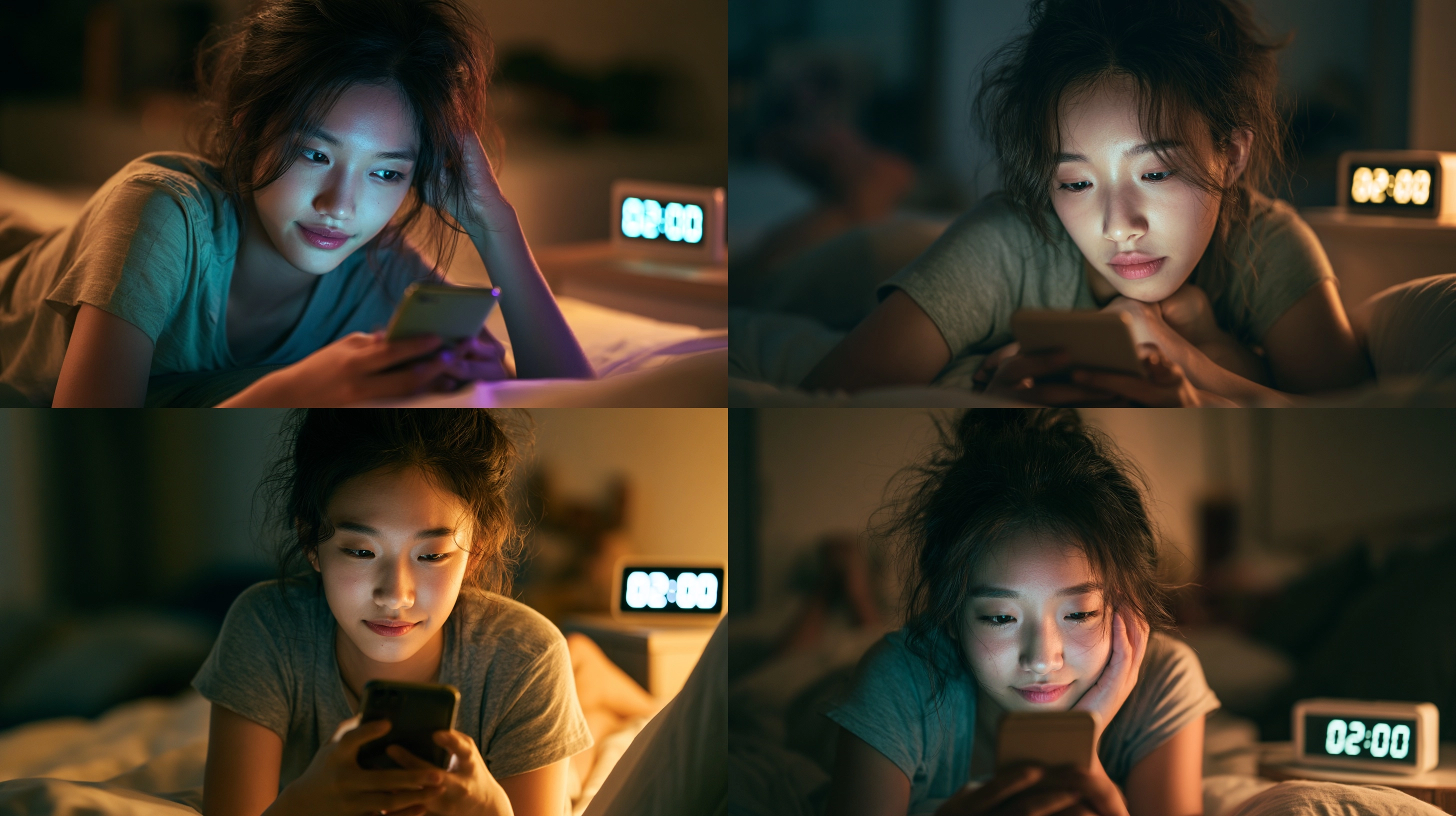
1차수정 (쓸데없는 감정표현, 접속사 제거, 새벽2시를 더 잘 보여주기위한 프롬프트 수정)
[prompt] realistic shot of a teenage Korean girl lounging on her bed, messy hair, casual thin short sleeve t-shirt, her eyes are locked on the glowing smartphone screen in her hands, her expression a mix of focus and subtle amusement, the soft light from the phone highlights her face, dimly lit room, blurred details in the background, a small digital alarm clock on a nightstand clearly displays the text "02:00", blending seamlessly with the calm, late-night atmosphere --ar 16:9
[2차 수정] 제미나이 추천프롬
A cinematic medium shot of a teenage Korean girl lying on her bed, messy hair, casual short sleeve t-shirt, looking down at a glowing smartphone. Soft blue screen light illuminating her face, dramatic chiaroscuro contrast, dimly lit bedroom, cozy late-night atmosphere, shot on 85mm lens, sharp focus, skin pores details, photorealistic, raw photo --ar 16:9 --v 8.1

2차수정(자체수정)
새벽2시인게 보였으면 좋겠어서
A cinematic medium shot of a teenage Korean girl lounging on her bed, messy hair, casual short sleeve t-shirt, looking down at a glowing smartphone. Soft blue screen light illuminating her face, dramatic chiaroscuro contrast, dimly lit bedroom, cozy late-night atmosphere, a small digital alarm clock on a nightstand clearly displays the text "02:00", shot on 85mm lens, sharp focus, skin pores details, photorealistic, raw photo --ar 16:9 --v 8.1

새벽2시인게 랜덤으로 보이긴 하지만 느낌은 확실히 새벽이구나 보여줘서 좋다.
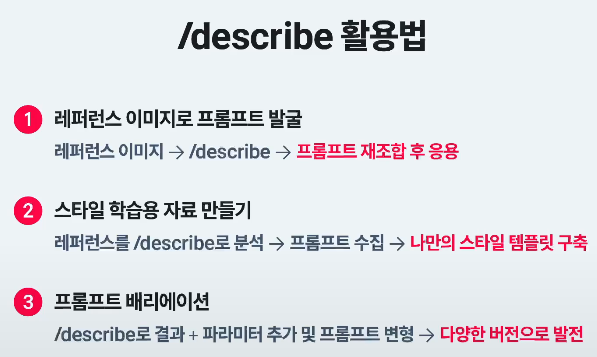
5-3. /describe
- 프롬프트 언어 학습
- 레퍼런스이미지에서 스타일 / 구성요소 텍스트로 추출
- 반복생성및 응용의 출발점으로 사용가능
- 놀라운 이미지분석력
- 미드저니 학습에 사용된 묘사에 효과적인 키워드 새롭게 제안
- 미드저니 학습에 사용된, 방대한 표현방법 분석에 도움
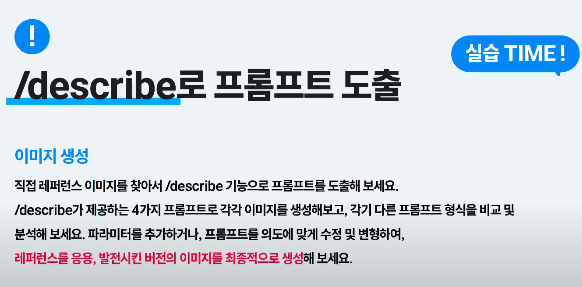
디스코드에서 /describe 작성후 [이미지 or 이미지링크] 삽입
describe가 4개의 프롬프트를 도출해냄
[실습]
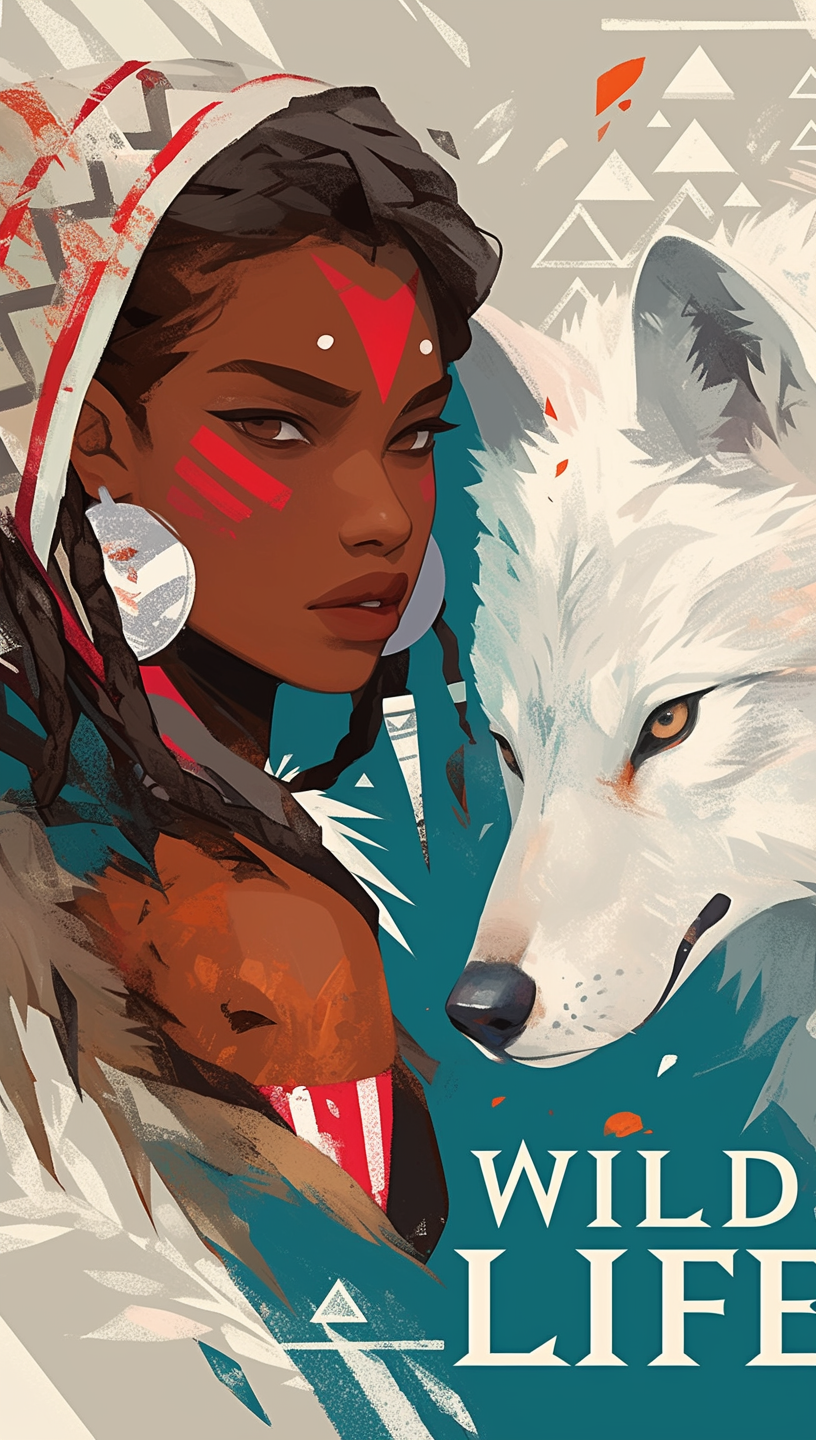
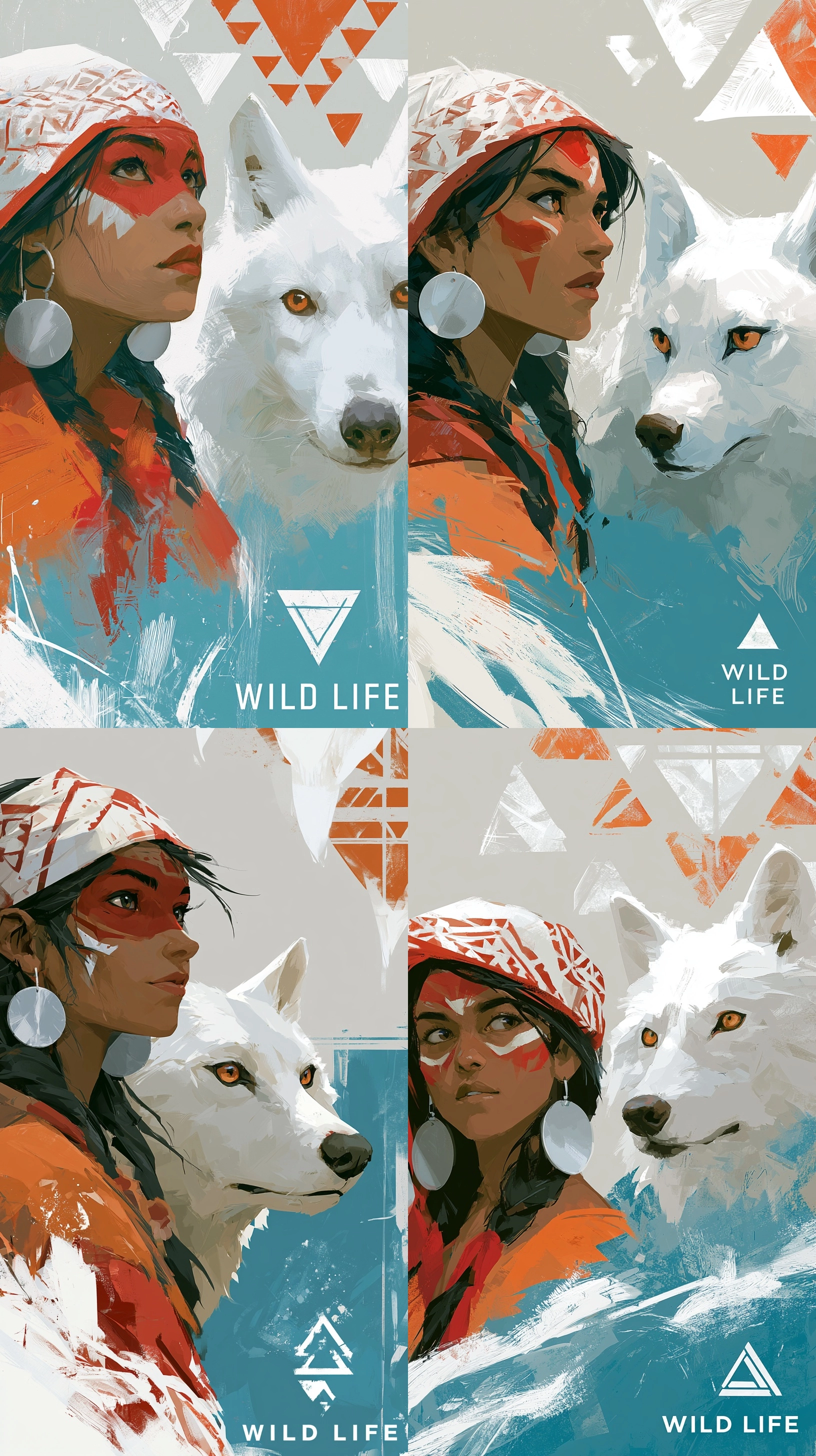
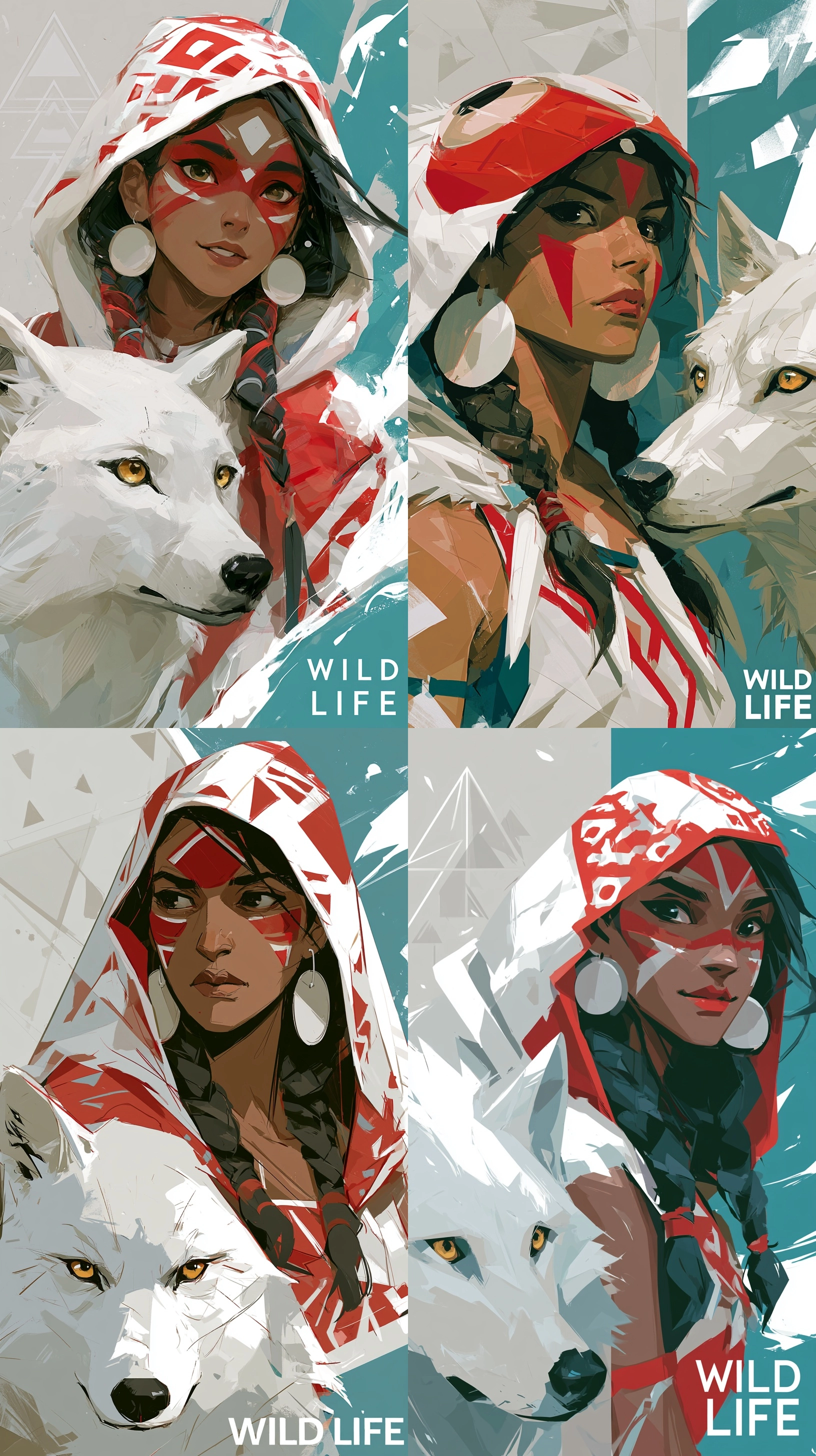
1️⃣ a stylized digital painting depicts a dark skinned woman on the left and a white wolf on the right, both looking forward. the woman has dark hair with braids, red and white face paint, and large silver disk earrings. she wears a patterned white and red head covering and an orange and red garment. the white wolf has amber eyes and a dark nose. the background is light gray at the top with abstract white and orange triangular patterns, transitioning to a teal blue at the bottom with white brushstrokes and a white triangular symbol. the words "wild life" are in white capital letters at the bottom right. --ar 9:16
2️⃣ a vibrant illustration features a woman with dark skin and braids, adorned with red and white facial markings and large round earrings, wearing a white and red patterned hood. she is positioned next to a white wolf with golden eyes and a black nose. the background elements include light gray with abstract triangles and teal with white highlights. the text "wild life" is visible in white at the bottom right of the image. --ar 9:16
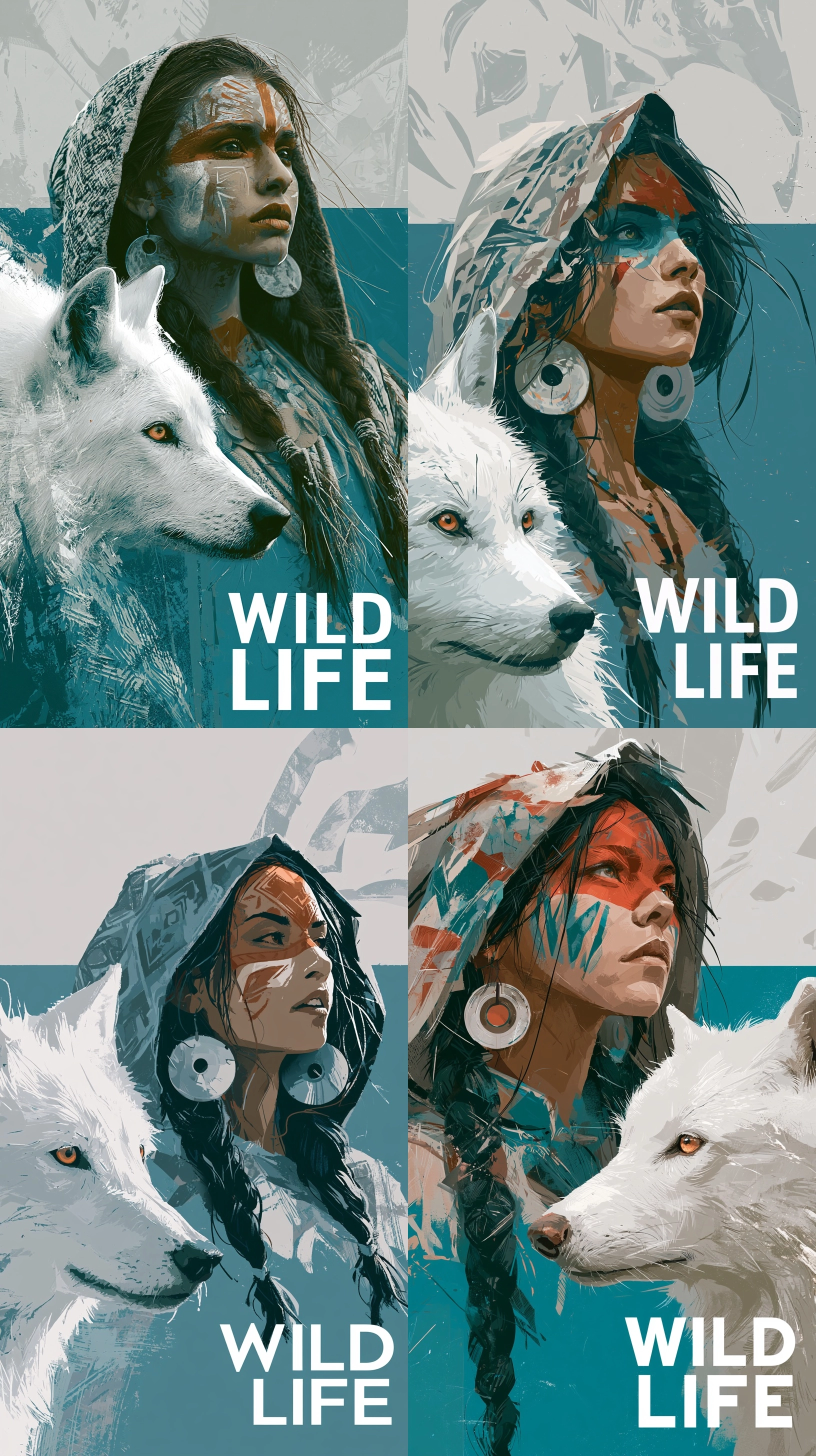
3️⃣ a portrait style image showcasing a dark skinned woman and a white wolf, facing the viewer. the woman has red and white facial designs, silver earrings, and a multi colored head covering. the wolf has amber eyes. the background is a mix of light gray with geometric patterns and teal. "wild life" is written in white block letters in the lower right. --ar 9:16
4️⃣ a graphic artwork of a woman with face paint and a white wolf. the woman has dark braids, a patterned hood, and large circular earrings. the wolf has warm toned eyes. the background consists of a light gray top section with abstract shapes and a teal bottom section. the words "wild life" are prominently displayed in white text at the bottom right. --ar 9:16
[평가 / 느낀점]
전체적으로 캐릭터의 스킨컬러, 늑대의 털색깔, 배경컬러, 텍스트 등 포인트가 될만한 부분들을 잘 살려서 프롬프트를 작성해 준것 같다. 다양한 프롬프트를 생성해보고 원하는 구성을 조절할 수 있어서 프롬프트 작성에 많은 도움이 될 것 같다.
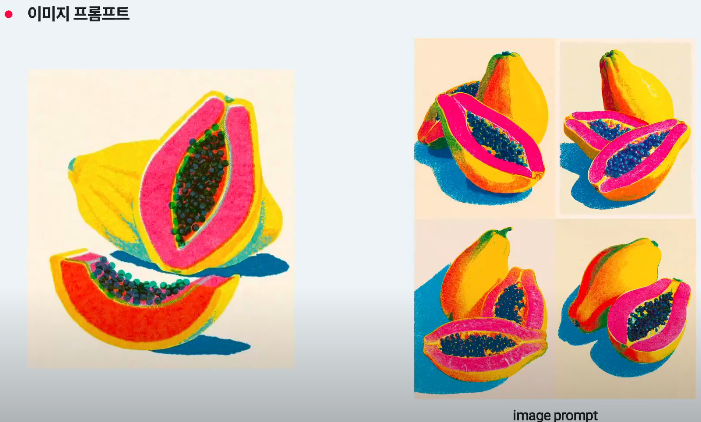
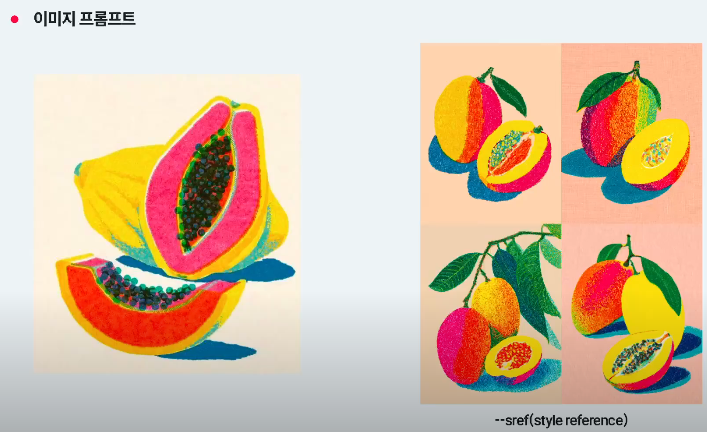
5-4. 이미지 프롬프트

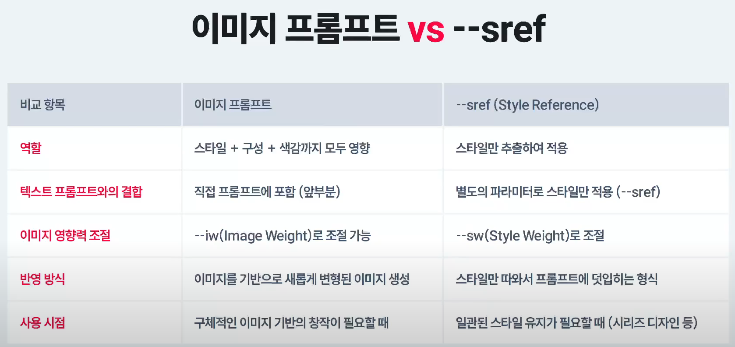
이미지 프롬프트는 나 이런거 만들어 줘. 느낌이고
sref는 이거참고해서 이런식으로 바꿔줘. 느낌..
5-5. 다중 프롬프트
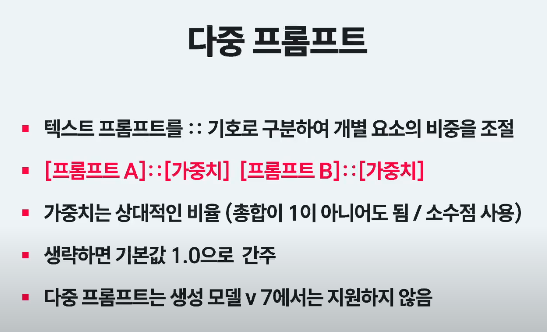
- 단어 사이에 :: 을 작성하는데 단어::단어::단어 이런식으로 띄어쓰기 없이 적용한다.
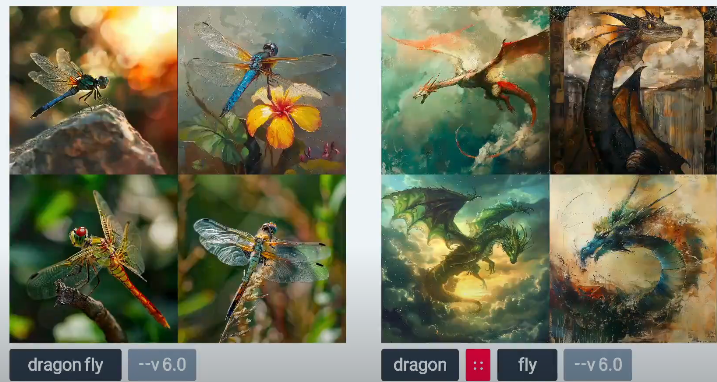
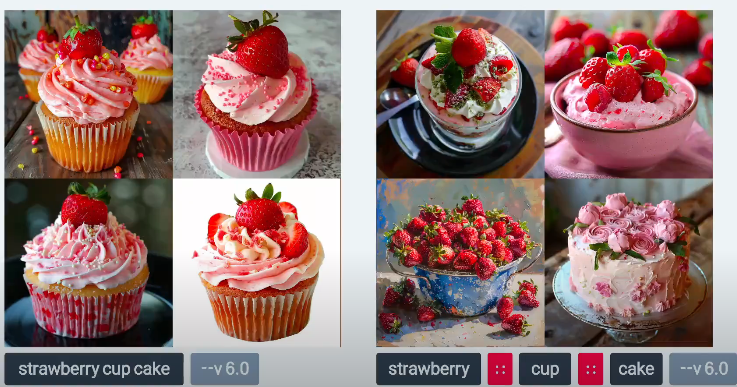
다중프롬프트는 2개이상 가능하지만 많아질 수록 몇개씩 빼먹고 적용하는 경우들이 생김.
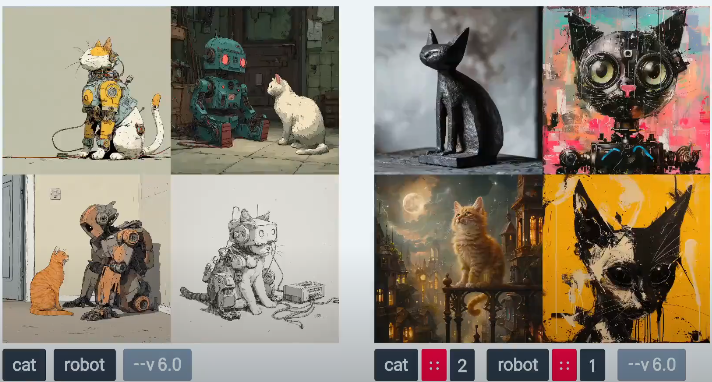
단어별 가중치를 책정하여 비중을 얼만큼 중요하게 둘건지도 작성할 수 있다.
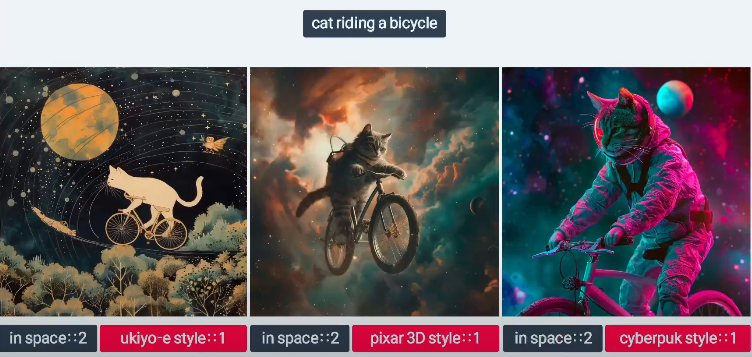
메인을 강도 2로 하고 스타일을 1로 해서 주제1개로 다양한 스타일을 보고싶을때도 사용한다.
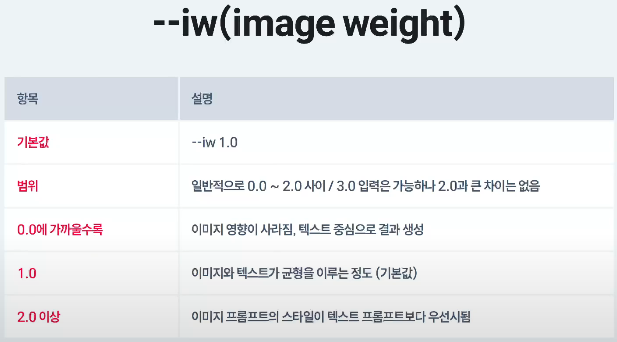
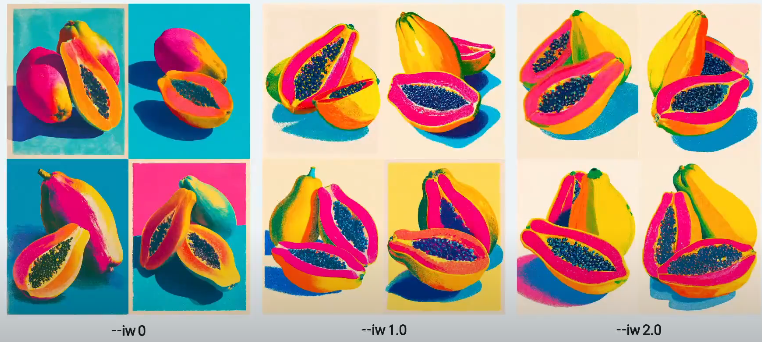
강도는 소수점으로도 조정할 수 있다.
1. 가중치(Weight)의 최소, 최대, 기본값
미드저니의 가중치 값은 기본적으로 실수(소수점 포함)를 사용해.
- 기본값 (생략 시): 1
- 단어 뒤에 아무것도 쓰지 않으면 자동으로 ::1이 작동하고 있는 상태야.
- 최솟값: 제한 없음 (하지만 실제로는 -0.5 이하로는 잘 안 씀)
- 음수(-) 값도 입력할 수 있어. 음수를 주면 "이 요소는 절대 그리지 마(제외해줘)"라는 뜻이 돼.
- 단, 시스템 안정성을 위해 음수 가중치의 총합은 양수 가중치보다 클 수 없어.
- 최댓값: 제한 없음 (하지만 실제로는 2나 3 위로는 의미가 없음)
- 10이나 100을 넣어도 작동은 하지만, 미드저니는 각 단어 간의 '상대적 비율'로만 계산하기 때문에 숫자를 무조건 크게 쓴다고 해서 더 세지거나 화질이 좋아지지 않아.
2. 미드저니 가중치의 핵심 작동 원리 (상대적 비율)
가장 중요한 기준은 "숫자의 절대적인 크기가 아니라, 단어들 간의 비율"이라는 점이야.
예시 A: hot dog ::2 예시 B: hot dog ::100
이 두 프롬프트는 AI에게 완전히 똑같은 결과를 줘. 왜냐하면 비교할 다른 가중치 단어가 없기 때문에 혼자서 100%의 비중을 차지하는 건 매한가지거든.
따라서 다른 단어와 섞어 쓸 때 비로소 가중치가 의미를 가져.
- vibrant painting ::2 + cyberpunk city ::1
- 👉 전체 그림에서 회화적인 느낌(2)을 사이버펑크 도시(1)보다 2배 더 강하게 반영해줘.
3. 실전에서 쓰는 가중치 조절 기준 가이드
미드저니 장인들이 실제로 조절할 때 쓰는 직관적인 기준 척도야. 보통 0.2 단위로 미세 조정을 많이 해.
- ::0.2 ~ 0.5 (약하게 추가): 전체적인 구도는 유지하면서 색감이나 분위기만 슬쩍 묻히고 싶을 때. (예: , cinematic lighting ::0.3)
- ::1 (표준): 기본 비중.
- ::1.5 ~ 2 (강하게 강조): AI가 자꾸 내 명령어를 무시하고 빼먹을 때, "이건 꼭 그려야 돼!" 하고 강조하는 수준.
- ::-0.5 (음수 가중치): 그림에서 원치 않는 요소를 완전히 배제할 때. (네거티브 프롬프트 파라미터인 --no와 똑같은 역할을 해.)
[느낀점]
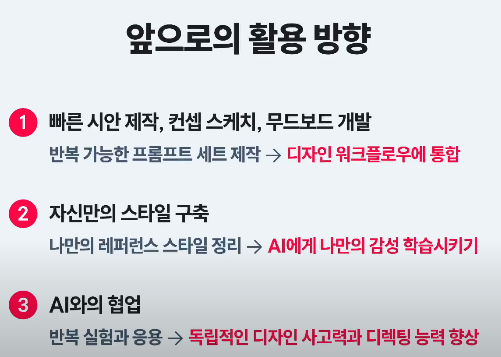
프롬프트 작성에 다양한 명령어가 적용된다는 것을 알았고 생각보다 디테일하게 조절할 수 있다는 것도 배웠다.
그래서 오히려 더 어려워 지긴 했지만, 다양한 실험을 해서 익숙해 져야 할 것 같다.
'AI디자이너 캠프' 카테고리의 다른 글
| [TIL] AI 그래픽 디자이너 D-12 P-code, 모델생성 가이드, ow (0) | 2026.06.23 |
|---|---|
| [TIL] AI 그래픽 디자이너 D-11 광고기획 프로세스 (0) | 2026.06.22 |
| [TIL] AI 그래픽 디자이너 D-9 (2) (0) | 2026.06.18 |
| TIL] AI 그래픽 디자이너 D-9 [style raw, sref, sw, cref, cw, tile] (0) | 2026.06.18 |
| [TIL] AI 그래픽 디자이너 D-8 (0) | 2026.06.17 |